Auto Lock
Walk-Away Auto Lock Settings:
After enabling this function, you can simply walk away after riding.
User Guide:
① Approach the vehicle, turn on your phone’s Bluetooth, and open the APP.
② Go to the [Control] section and check whether Bluetooth is connected in the upper‑right corner.
③ After Bluetooth successfully connects, click the [More Setting] interface.
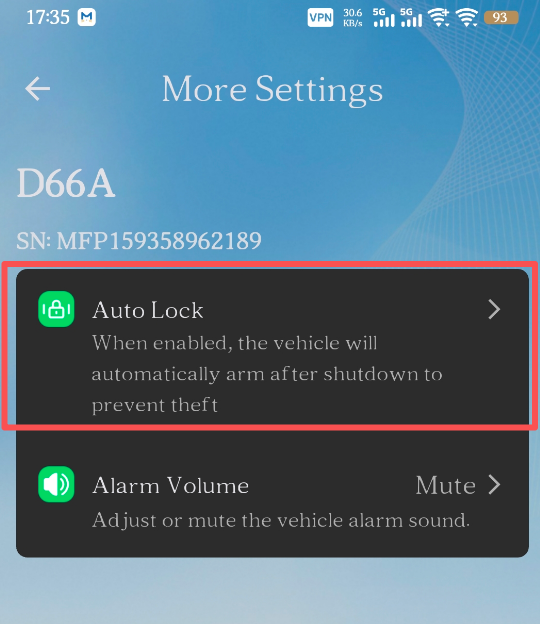
④ Scroll down to find the [Auto Lock] option and tap to enter the settings page.
⑤ Turn on the function switch to enable this feature.
⑥ You can drag the progress bar to set the waiting time according to your preference.
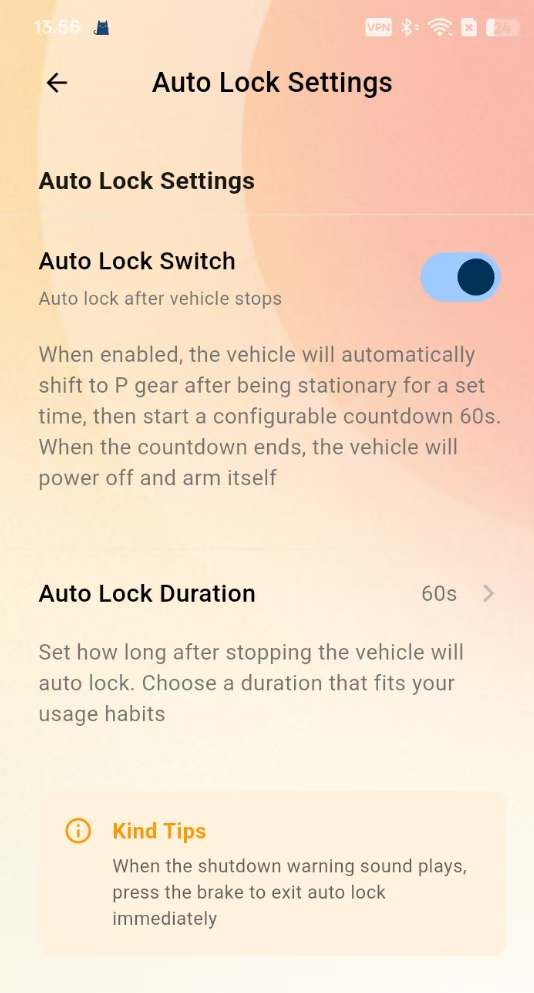
⑦ After successful setup, when you park and walk away, the vehicle will start timing after it enters P‑gear while stationary. Once the set time is exceeded, the vehicle will automatically power off.
TIPS:
①During the auto‑shutdown countdown, you can quickly squeeze the brake once to force‑cancel and exit the walk‑away auto lock procedure.
②This function is only available to the vehicle owner’s account.