T80C · APP Vehicle Settings
Alarm Volume
Alarm Volume Settings:
You can adjust the vehicle’s alarm volume according to your preference.
User Guide:
① Approach the vehicle, turn on your phone’s Bluetooth, and open the APP.
② Go to the [Control] section and check whether Bluetooth is connected in the upper‑right corner.
③ After Bluetooth successfully connects, scroll down to enter the [More Setting] interface.
④ Scroll down to find the [Alarm Volume] option and tap to enter the settings page.
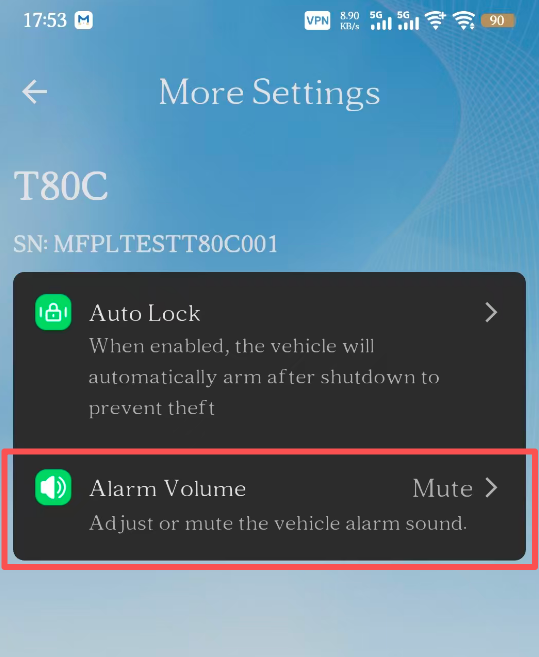
⑤ You can set the vehicle alarm volume to High, Medium, Low, or Mute according to your preference.
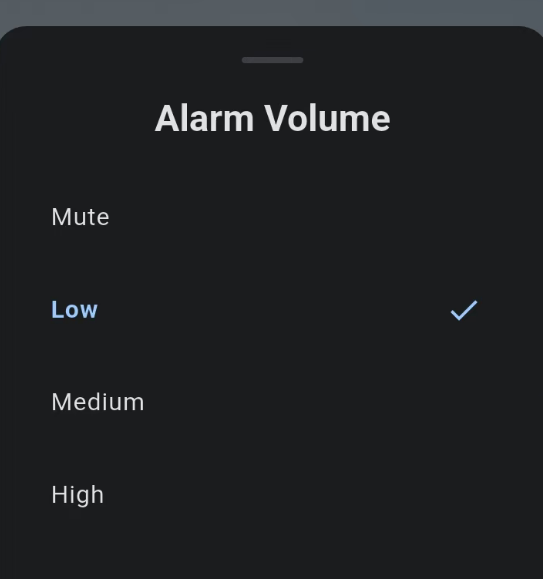
⑥ After successful setup, the vehicle volume will sync automatically.
TIPS:
① This function is only available to the vehicle owner’s account.