Speed Limiting
Speed Limit:
This feature allows you to set the vehicle’s maximum speed, ensuring riding safety — especially suitable for beginners or speed management under specific road conditions.
Setup Steps:
① Open the APP, and Go to the [Control] section.
② Check whether Bluetooth or 4G channel is connected in the upper‑right corner.
③ After the vehicle is successfully connected, scroll down to enter the [More Settings] interface.
④ Find the [Speed Limit] option and tap to enter the settings page.

⑤ Enter the desired speed limit value (unit: km/h, range: 20‑70 km/h), then tap to save the setting.
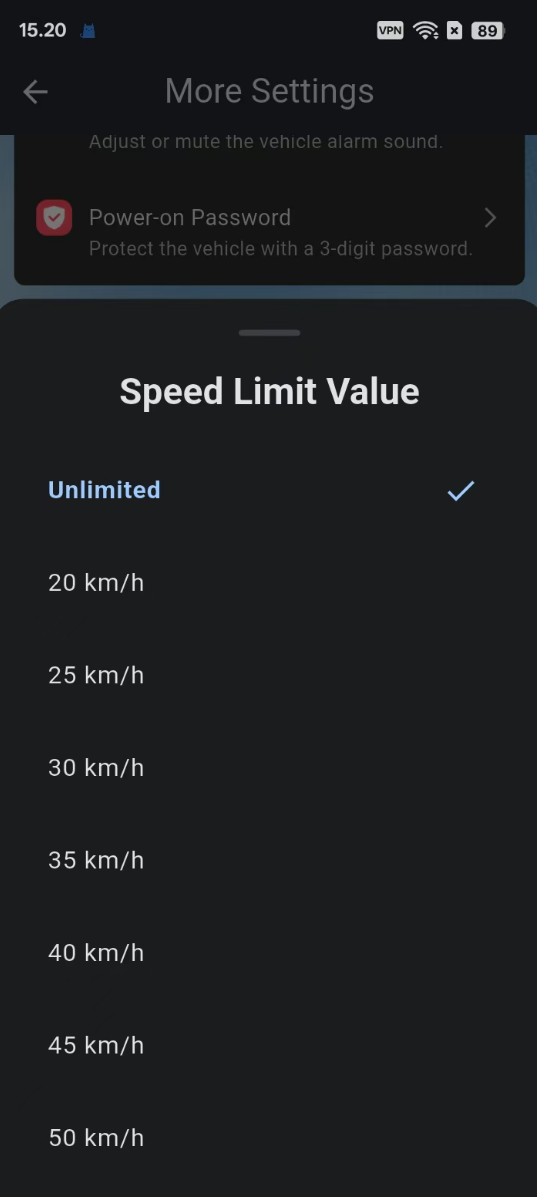
⑥ After successful setup, the vehicle’s maximum speed will be limited to the value you set.
TIPS:
① This setting is only available to the vehicle owner’s account.
② To disable the speed limit after setting, re‑enter this interface and tap to turn off the speed limit switch.
③Cloud Box must be installed to obtain this feature
How to Use Speed Limit:
① Once set, the vehicle will automatically limit its speed to no more than the set value while riding — no additional operation is required.
② When the speed limit is active, even if you twist the throttle fully, the vehicle speed will not exceed the set upper limit.