Alarm Sensitivity Setting
Alarm Sensitivity:
You can adjust the vehicle’s alarm sensitivity according to your usage scenario to avoid false alarms or enhance protection.
Setup Steps:
① Approach the vehicle, turn on your phone’s Bluetooth, and open the APP.
② Go to the [Control] section and check whether Bluetooth is connected in the upper‑right corner.
③ After Bluetooth successfully connects, scroll down to enter the [More Settings] interface.
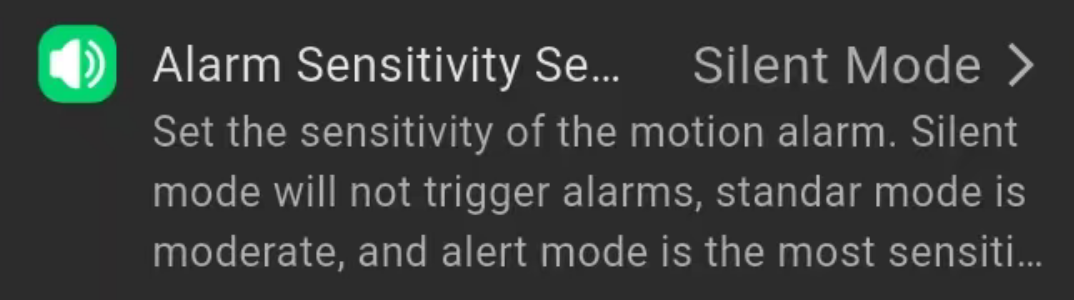
④ Find the [Alarm Sensitivity] option and tap to enter the settings page.
⑤ Select the desired sensitivity level: 'Silent/Standard/Alert'.
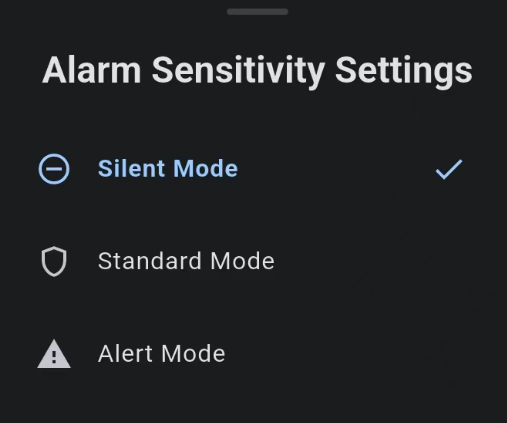
⑥ After successful setup, the vehicle will automatically save the configuration and the alarm settings will take effect immediately.
TIPS:
① This setting is only available to the vehicle owner’s account.
② Cloud Box must be installed to obtain this feature