SOH - Battery Health Monitor
SOH - Battery Health:
The SOH (State of Health) feature evaluates the current health status of the battery, helping you understand the degree of battery aging and remaining service life. This allows for timely maintenance or replacement, ensuring riding safety and range performance.
Feature Description:
Good:≥ 80%
Normal:60% - 80%
Attention Needed:< 60%
How to View:
① Open the APP and go to the [Control] section.
② Ensure the vehicle is equipped with a Cloud Box and 4G online.
③ Tap the battery level icon to enter the [Battery Detail] page.
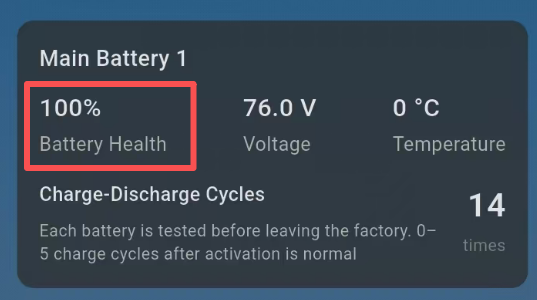
④ On the battery details page, you can view the SOH battery health percentage.
Factors Affecting SOH:
① Charge-Discharge Cycle Count: Each full charge-discharge cycle causes slight wear to the battery. The higher the cycle count, the lower the SOH value gradually becomes.
② Operating Environment Temperature: Prolonged use in extremely cold or hot environments accelerates battery aging.
③ Charging Habits: Long-term overcharging, deep discharging, or use of non-original chargers may negatively impact battery health.
④ Storage Method: Storing the battery with very low charge or at full charge for extended periods may accelerate capacity degradation.
Usage Recommendations:
① It is recommended to check the SOH value every 3-6 months to monitor battery health.
② When the SOH value drops below 60%, it is advisable to visit an authorized service center for professional inspection.
③ In daily use, try to keep the battery charged within the 20%-80% range to help extend battery life.
④ When the vehicle is not in use for an extended period, it is recommended to charge the battery to 50%-60% and store it in a cool, dry place.
TIPS:
① The SOH value is an estimated figure for reference only. Actual battery performance may vary depending on usage habits and environmental conditions.
②Cloud Box must be installed to obtain this feature