Charging Cycles
Charge Cycle Count:
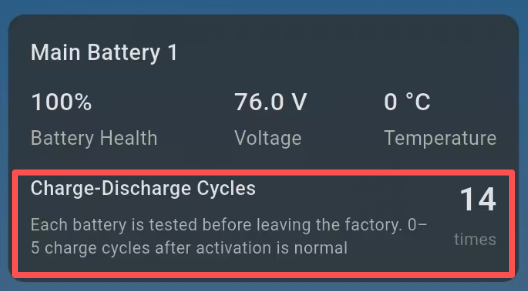
Charge cycle count refers to the total number of complete charge-discharge cycles the battery has undergone. One cycle is counted each time the battery goes from 0% to 100% of a full charge-discharge process.
How to View:
① Open the APP and go to the [Control] section.
② Ensure the vehicle is equipped with a Cloud Box and connected via 4G.
③ Tap the battery level icon to enter the [Battery Detail] page.
④ On the battery details page, you can view the charge cycle count.
Factors Affecting Cycle Count:
① The higher the cycle count, the more the battery capacity gradually decreases, leading to a lower SOH value.
② Frequent deep charge-discharge cycles (e.g., draining the battery to 0% and then fully charging) accelerate the accumulation of cycle count.
③ Long-term use or charging in extreme temperatures can also affect battery cycle life.
Usage Recommendations:
In daily use, try to keep the battery charged within the 20%-80% range and avoid frequent deep discharges to help extend battery cycle life.
Note:
①Cloud Box must be installed to obtain this feature